Download WAAI
Pick your platform. WAAI auto-updates in the background, so you'll always be on the latest release.
Need help installing? See the Windows installation guide below.
Windows
Latest release
DownloadWindows may show a "Windows protected your PC" notice on first run, since this installer isn't code-signed yet. Click More info → Run anyway to continue. This is standard for new installers and doesn't mean anything is wrong.
macOS
Latest release
Coming soonLinux
Latest release
Coming soonSystem requirements: Windows 10+, macOS 11+, or a modern Linux distro. You'll also need WhatsApp on your phone to link the app - it works the same way WhatsApp Web does.
Windows SmartScreen: how to run WAAI
On first launch, Windows may block the installer because it isn't code-signed yet. This is normal for new apps and doesn't mean anything is wrong. Follow these two steps to continue.
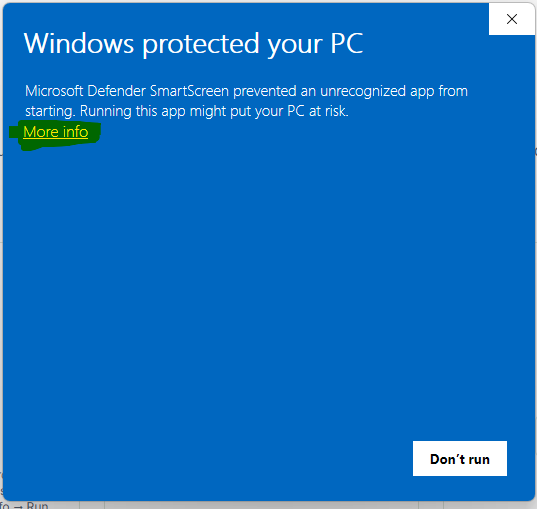
Click "More info"
When you see the "Windows protected your PC" screen, click the More info link (highlighted below). The Don't run button is the default, so don't click it.
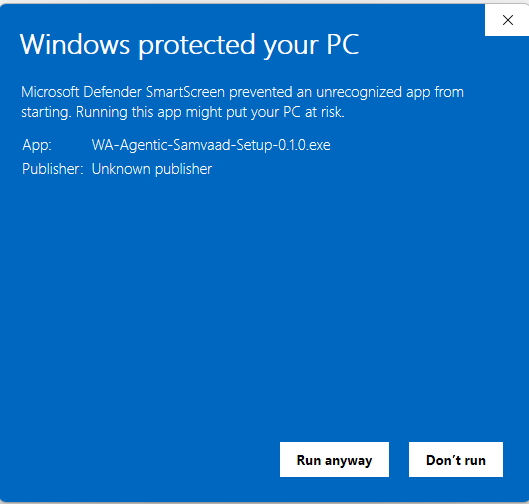
Click "Run anyway"
The dialog now shows the app name WA-Agentic-Samvaad-Setup-0.1.0.exe and a Run anyway button. Click it to start the installer.
We're working on code-signing the installer, which will remove this warning in a future release.